Foodle Unlimited — Play Free Food Word Puzzle Game Online
Welcome to Foodle Unlimited, a free daily word game available online. It's a fun and straightforward game where you have to uncover a new word every 24 hours. You can enjoy the food-themed puzzles on our website without any need for registration.
Guess the hidden Foodle word within 6 attempts.
In this game, you are presented with a Foodle puzzle and six chances to figure out the word. Correct guesses allow you to progress, while incorrect ones provide you with hints. The game is unblocked and has no limits, so you can keep playing until you solve all the words!
To uncover the hidden word in 6 tries, you must input valid 5-letter words related to food. Random letters are not allowed. Once you think you've guessed the word, press enter, and the tile color will change. Good luck!
How to play Foodle Unlimited Free
To start playing Foodle Unlimited Free, click on the gear icon and choose your desired game mode: daily, hourly, or infinite. After selecting your preferred time frame, close the dialog box, and the game will commence!
You can switch between game modes by clicking on the Foodle Unlimited logo at the top of the main screen.
Understanding the colors in Foodle
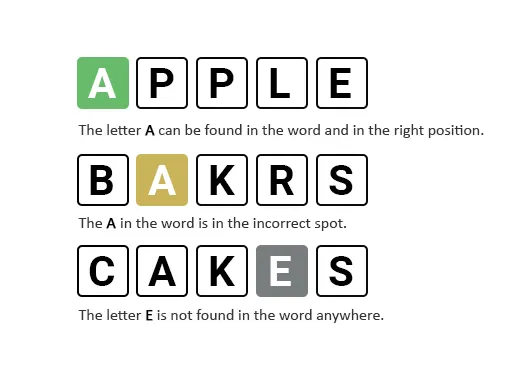
In Foodle, you have 6 attempts to guess a word. The color of the letter background changes after each attempt to indicate your proximity to the correct answer. A gray background means the letter is not in the word, yellow signifies the letter is in the word but not in the right place, and green indicates the correct position of the letter. Remember, the word will always be a valid food-related term from the dictionary.
- Green indicates correct letter placement.
- Yellow means the letter is in the word but not in the right spot.
- Gray signifies that the letter is not part of the word.
Increasing the difficulty of Foodle
By default, Foodle starts in Normal mode. To ramp up the challenge and make words harder to guess, switch to Hard mode:
- Click on the settings icon (Gear icon) in the top-right corner.
- Activate Hard mode.
- Close the dialog box.
Your Foodle game will now be more challenging in Hard mode, requiring strategic thinking for solving less predictable words.
Tips for mastering Foodle Unlimited
- Begin with common vowels and consonants.
- Use process of elimination.
- Focus on food-related words.
- Practice regularly.
We hope these tips assist you in becoming a Foodle master! Enjoy playing Foodle Unlimited and have fun exploring food-related vocabulary. Happy guessing!